How to calculate distances on the Earth
Here, we demonstrate a few different approaches to calculate the distance between coordinates on the Earth’s surface.
Let’s define some arbitrary coordinates
[3]:
# lat1, lon1, lat2, lon2 = (16, -60, 16, -45)
lat1, lon1, lat2, lon2 = (51.53, -0.08, 43.17, 132)
and see how this looks like for different transformations.
[4]:
import matplotlib.pyplot as plt
import cartopy.crs as ccrs

ax = plt.axes(projection=ccrs.Robinson())

ax.set_global()
ax.coastlines()

plt.plot((lon1, lon2), (lat1, lat2), transform=ccrs.Geodetic(), color='red',)
plt.plot((lon1, lon2), (lat1, lat2), transform=ccrs.PlateCarree(), color='blue', ls=':');
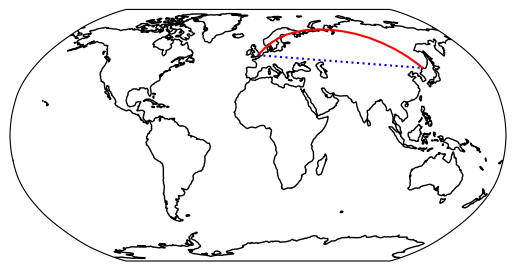
Depending on the projection, there are, apparently, different ways to calculate the distance between two points on the Earth’s surface. Here, we will demonstrate a few different approaches to calculate the distance between coordinates on the Earth’s surface.
Pyproj
The first example makes use of the {class}pyproj.Geod object. Its method {meth}~pyproj.Geod.geometry_length accepts a {obj}shapely.LineString object and returns the distance in meters.
[6]:
from shapely import LineString
from pyproj import Geod

# only for the first example
ls = LineString([(lon1, lat1), (lon2, lat2)])   # ← keep in mind the reverse order compared to the other following examples!
geod = Geod(ellps="WGS84")
[7]:
# %%timeit  # 12 µs ± 22.2 ns per loop (mean ± std. dev. of 7 runs, 100,000 loops each)
geod.geometry_length(ls)/1e3
[7]:
8542.610993959972
Geopy
The second to fourth example make use of the {mod}geopy library. All methods accept tuples of (lat, lon) values. The fastest results are obtained with the function {class}~geopy.distance.great_circle. However, one should keep in mind that this uses a very simplified “model” of the Earth. More accurate results are obtained with the methods {obj}~geopy.distance.distance and {class}~geopy.distance.geodesic.
[8]:
from geopy import distance

# %%timeit  # 6.7 µs ± 11.9 ns per loop (mean ± std. dev. of 7 runs, 100,000 loops each)
distance.great_circle((lat1, lon1), (lat2, lon2)).km
[8]:
8518.581851143874
[9]:
# %%timeit  # 141 µs ± 1.36 µs per loop (mean ± std. dev. of 7 runs, 10,000 loops each)
distance.distance((lat1, lon1), (lat2, lon2)).km
[9]:
8542.610993959972
[10]:
# %%timeit  # 143 µs ± 415 ns per loop (mean ± std. dev. of 7 runs, 10,000 loops each)
distance.geodesic((lat1, lon1), (lat2, lon2), ellipsoid='WGS-84').km
[10]:
8542.610993959972
Conclusions
Depending on how many coordinates you have, you might want to choose a method with a shorter runtime. However, if accuracy is important, you should choose one of the other methods.